General Information
Learn more about how Free Food Alert helps remediate food waste and curb hunger on campus!
Free Food Alert was founded in 2017 at Johns Hopkins University in the United States. The founder, Noémie (Nemo) Keller, was shocked by the amount of leftover food that was not consumed and therefore wasted at the end of campus events. So, in her final year as a student at Johns Hopkins, she decided to use technology to tackle the systematic problem of food waste on campus. After successfully piloting the program with simple email alerts in spring 2017, she launched the first version of Free Food Alert in summer 2017. Initially, the platform was only available to the Johns Hopkins community. The new version of the platform available to all universities worldwide was launched in April 2023.
Each university has administrators who manage and run the Free Food Alert program on their campuses. The company behind the software, Free Food Alert LLC, is led by its founder and CEO, Noémie (Nemo) Keller. Currently, Free Food Alert is active at more than 10 universities in the United States and Canada.
Students, faculty, staff and other community members can create a Free Food Alert account to receive email alerts and push notification alerts from the mobile app when there is free food available on campus. Any user can then apply directly in the platform to become a free food giveaway host who sends alerts at the end of their campus events.
Together, we can remediate food waste and help curb hunger on campus -- Let's do it!
Anybody with an academic email ending in ".edu" or ".ca" can sign up for a Free Food Alert account. The account is 100% free for students, faculty, staff and other community members (forever & always)!
In order to receive notifications about free food, your university must be an active member of the Free Food Alert alliance. Your University pays a membership fee in order to maintain and improve the Free Food Alert platform as part of your university benefits and sustainability initiatives.
If your University is not yet an active member, then you will not be able to receive any free food alert notifications. Once your University purchases a Free Food Alert membership, your account will be automatically activated and you will begin to receive alerts. To see a list of the active member universities, go to the Membership page.
If you are a University administrator, you can sign up for a 1-semester free trial after completing the Program Overview eLearning course.
If you are a University Administrator, you can sign up for a 1-semester free trial through our Program Overview eLearning Course, which provides all information about the program.
After an alert is sent out by the givewaway host, community members will have between 15 and 60 minutes to collect the free food. Members should bring their own reusable container to collect the food.
The frequency of alerts you will receive depends on the number of giveaways hosted within your campus community. Once you sign up for a Free Food Alert account you will have the ability to complete an in-platform eLearning course to become a giveaway host and begin sending out your own free food alerts, after your application is approved by your university administrator.
The number of people benefiting from a free food giveaway depends on many factors, such as the number of subscribers enrolled at a university, the type of food available, and the duration of the distribution.
The quality and safety of the food distributed is the responsibility of the giveaway organizer, who sends the alert and manages the event. While no campus event with food can be risk-free, Free Food Alert has a track record of over 650 giveaways without a single food safety incident.
Contact Us to share suggested improvements to Free Food Alert. We appreciate your feedback!
In an effort to be open and welcoming to all, Free Food Alert provides information about special dietary options and potential allergens included in the giveaway food within the alerts. Specifically:
- Special Dietary Options: Vegan, Vegetarian, Gluten Free, Kosher, Halal
- Allergens: Milk, Eggs, Fish, Crustacean Shellfish, Tree Nuts, Peanuts, Wheat, Soybeans, Sesame, and Other Allergen(s)
If you have feedback on this feature, please Contact Us.
Free Food Alert cannot guarantee the accuracy of any information included in free food alerts. The accuracy of the dietary restrictions and allergens presented remains the sole responsibility of the giveaway host and the participant.
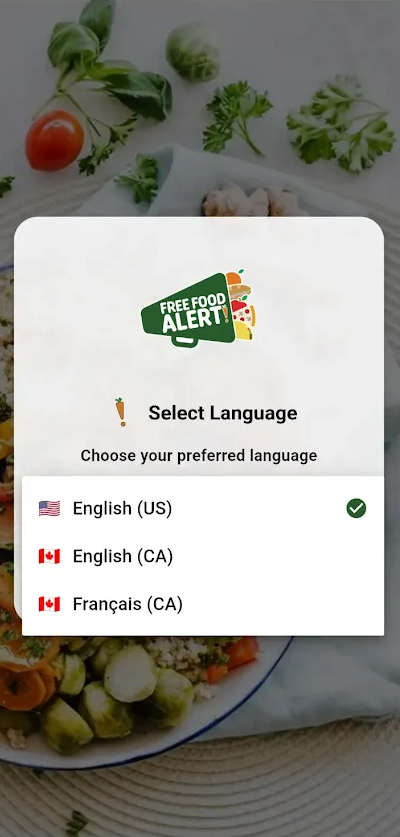
You can change the language of the website in the footer section. Simply scroll to the bottom of the page and select your preferred language.

To change the language of email alerts and receive notifications in your preferred language, go to your Subscriber Preferences and select the desired language.
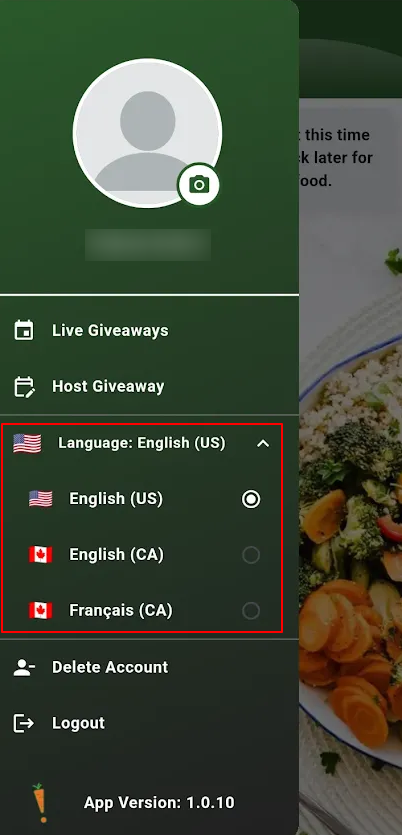
On the Free Food Alert mobile app, you can select your preferred language on the sign in page. Once logged in, you can also update your language preference through the navigation icon in the top-left.
Too Good To Go is a great solution for direct vendor to customer food waste recovery at a low cost to users. However, we believe Free Food Alert serves a different purpose and specifically adds value as a free to use solution to on-campus surplus food waste. Here's a recap of the differences:
Free Food Alert:
- Difference: Offers free leftover food from university campus events.
- Better aspects: No cost for users (sponsored directly by the university), direct waste reduction on campus, directly controlled by university administrators, food waste & hunger data analytics available for university administrators
- Limitations: Limited availability (only available at universities participating in a free trial or that have purchased a membership)
Too Good to Go:
- Difference: Sells discounted "Surprise Bags" of surplus food from businesses.
- Better aspects: Wide availability, variety of food, cost savings.
- Limitations: Not free for users, "surprise" contents, specific pickup times, not controlled by university administrators
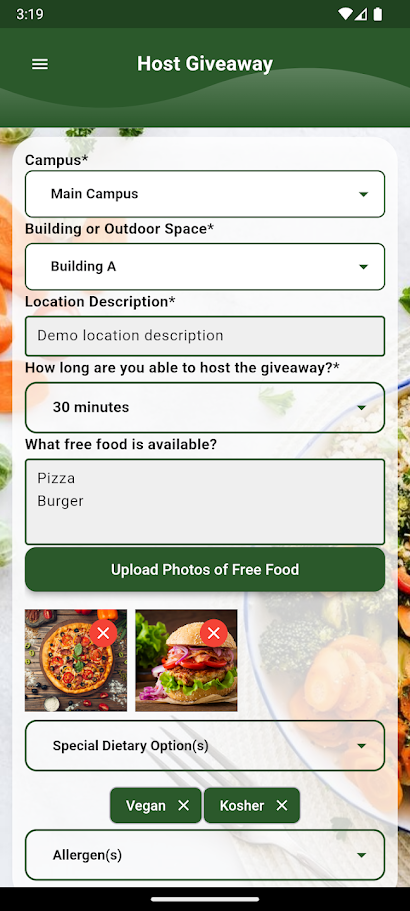
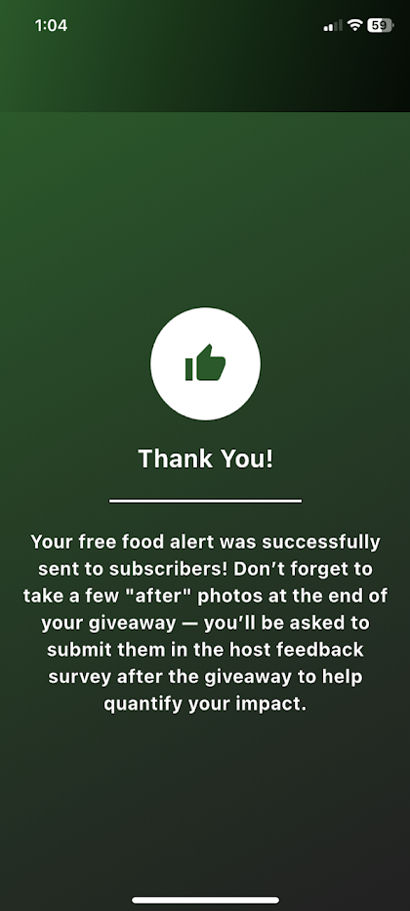
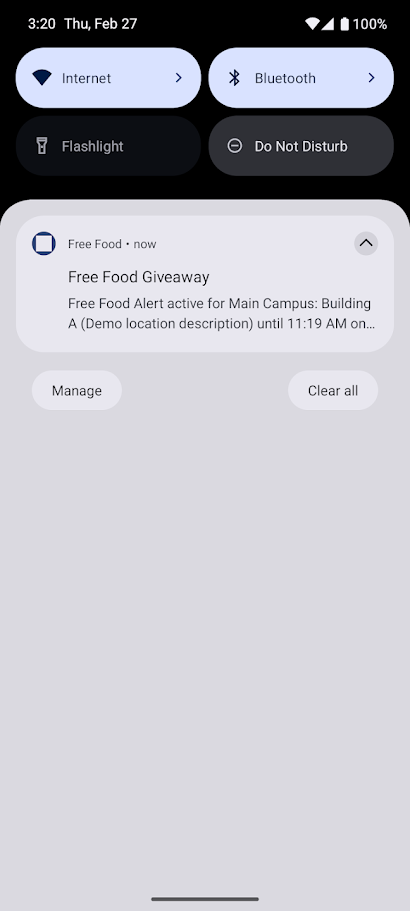
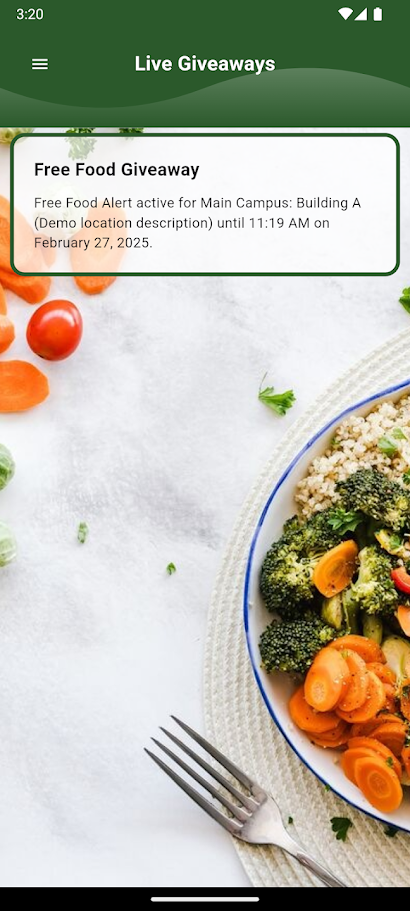
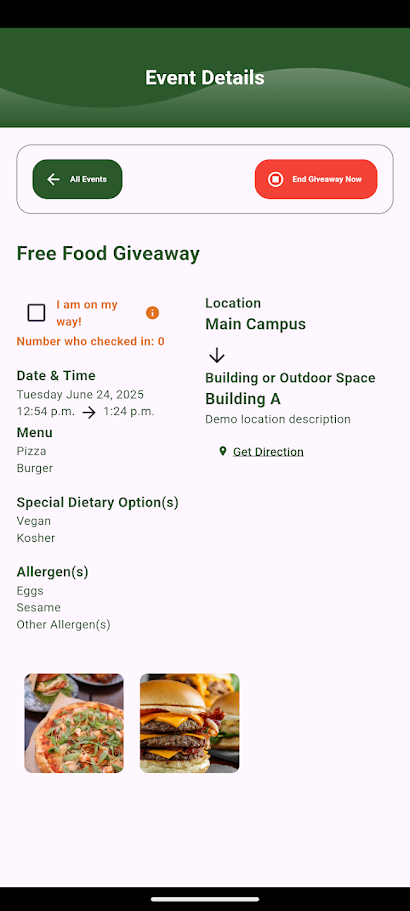
The Free Food Alert mobile app has a clean, easy-to-use interface designed to help you find and share free food quickly. Here’s what you can do in the app:
✅ Host Giveaways – Create and publish food giveaways with pickup details.
✅ Giveaway Notifications – Receive instant alerts when new giveaways are posted nearby.
✅ See Live Giveaways – Browse a real-time feed of active giveaways happening around you.
✅ View Event Details – Tap on any giveaway to see full details, photos, location on the map, and pickup instructions.
✅ Use the Interactive Map – Find giveaways pinned on a map for easy directions.
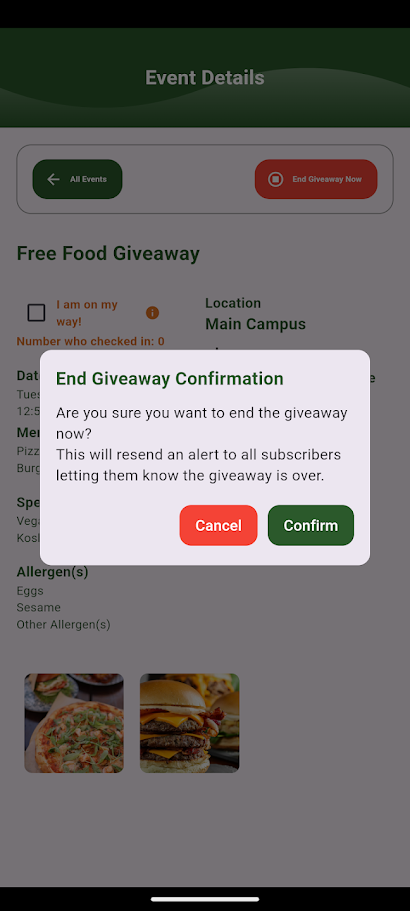
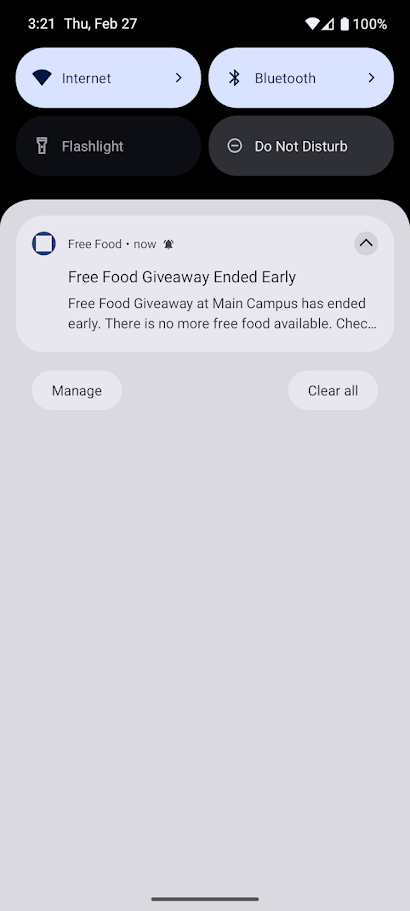
✅ End Giveaways – Hosts can end giveaways when food is no longer available.
✅ End Giveaways Notification – Resend an alert to all subscribers letting them know the giveaway is over.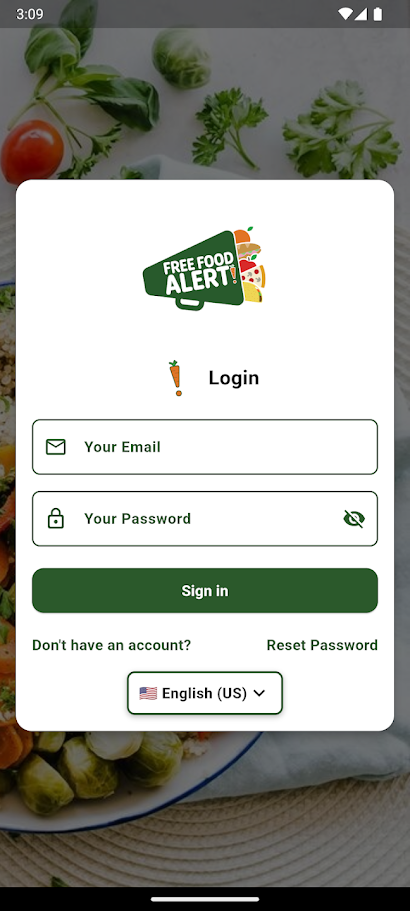
You can watch our videos on our official YouTube channel here: https://www.youtube.com/@FreeFoodAlert
Students, Faculty, and Staff
All student, faculty, staff, or other university community members can sign up for a Free Food Alert account in order to receive notifications about free food on campus.
To sign up and receive free food alerts, all you need is an e-mail address linked to a university that is a member of the Free Food Alert alliance.
Simply click the Sign Up button below and fill in the basic information, including:
- Email (Please use your institutional email address (e.g., .edu, .org, .gov, or an accredited university domain such as .ca))
- Name
Then, you will need to verify your email address and define a password in order to finish setting up your account.
First, please double check your spam and junk folders. Verification emails may take up to 24 hours to appear in your inbox due to your university's email settings. Adding food@freefoodalert.com to your contacts can help ensure you receive all emails promptly and in the correct inbox.
In case of persistent issues, please Contact Us for assistance.
If your University is not yet an active member of the Free Food Alert alliance, then you will not be able to receive any Free Food Alert notifications. Once your University purchases a Free Food Alert membership, your account will automatically be activated and you will begin to receive alerts.
To see the list of universities with an active membership, check out the Membership page.
If you are a University administrator, you can sign up for a 1-semester free trial at any time by completing the Program Overview eLearning Course.
You can define the campuses or locations for which you want to receive Free Food Alert notifications in your Subscriber Preferences. You can select one or more campuses or locations. Campuses and locations are managed by your university administrators. Please reach out to them directly with any feedback on campuses or locations you would like to add to the list.
In order to receive Free Food Alert mobile smartphone push notifications, you must download and log into the app.
In order to turn off all notifications simply:
- Uncheck the "Email Alerts" option in your Subscriber Preferences
- Delete the Free Food Alert mobile app from your phone (if applicable)
You can delete your account at any time via your Account Settings.
Subscribers are encouraged to carry a reusable container when near campus in order to ensure you're ready to take advantage of the next Free Food Alert! There is no guarantee that plates, napkins, or cutlery will be available during a free food Giveaway.
Event Caterers & Hosts
Anybody with a Free Food Alert account who hosts events with food on campus can sign up to send out alerts for free food giveaways!
First, sign up for a Free Food Alert account. Once your email is verified, complete the Giveaway Host Training. Then, an administrator from your university will review your application. Once approved, you can send out alerts at the end of your campus events to notify all subscribers at your university about free food.
Your university Free Food Alert administrator will review and approve your giveaway host application. In case of any questions about your giveaway host status, please reach out directly to your university administrator.
In order to turn off all notifications simply:
- Uncheck the "Email Alerts" option in your Subscriber Preferences
- Delete the Free Food Alert mobile app from your phone (if applicable)
University Administrators
As an administrator, you can purchase a Free Food Alert alliance membership in order to unlock the power of Free Food Alert for your entire university community.
If you are a University Administrator, you can sign up for a 1-semester free trial through our Program Overview eLearning Course, which provides all information about the program.
The cost of a Free Food Alert membership depends on the size of your university. Details regarding pricing can be found at the bottom of the Membership page.
Free Food Alert defines a university based on its IPEDS Unit Number. Each university with a unique IPEDS number is treated as a separate organization in the system.
This ensures:
- Local Administration: Individual campus staff can manage their own alerts and users.
- Granular Statistics: Each university can track its own impact, food waste reduction, food insecurity stats, and student engagement data.
- Associated Controls: Specific university-customized eLearning training tailored to each unique campus and student population.
As a result, membership pricing is determined per IPEDS-identified university.
Yes. Contact Us to learn more about the Free Food Alert Enterprise Edition.
The cost of a Free Food Alert membership depends on the size of your university. Details regarding pricing can be found at the bottom of the Membership page.
Implementing Free Food Alert at your university is extremely simple!
Here are the steps to start your 1-semester free trial:
- Complete the Program Overview eLearning Course: Watch the short, interactive videos in order to learn everything you need to know about the program. (60 minutes)
- Complete the Getting Started Survey to official request a 1-semester free trial. (30 minutes)
- Somebody from our team will be in touch to schedule your admin training after you complete the survey.
- Attend the Admin Training to learn about the key responsibilities of an admin and learn how to use the backend features of Free Food Alert. (60 minutes)
And voila, that's it! ✨
After the admin training you will be fully ramped up and ready to start marketing for Free Food Alert on campus.
There are no special conditions for the 1-semester free trial. 100% of all the Free Food Alert features are available with zero restrictions or ommissions. You can test the entire platform for an entire semester and then decide if you'd like to proceed with a full, paid membership at the end of the semester. If you choose to stop at the end of the free trial there are no penalties or fees.
No. After the free trial ends, a full 12-month paid membership is required to continue using the platform. Semester-by-semester pricing is not available. Free Food Alert memberships run for one full calendar year, typically starting from the date you transition out of your free trial. For example, if your free trial ends December 31, 2025, your paid membership would run from January 1, 2026 to December 31, 2026.
Yes, university admins have full control over who is approved to send out alerts. Anybody from your university can complete the in-platform "Giveaway Host Training" eLearning course in order to apply to become a Host who can send out alerts. However, each application must be reviewed and approved by an admin before the user is approved to send out alerts.
Some universities choose to allow all users (faculty, staff, and students) to send out alerts while other universities restrict this feature to send alerts to only a subset of users (like official faculty and staff, for example).
Yes, the "Giveaway Host Training" can be customized by admins to ensure it meets the requirements required for their university. Admins are completely autonomous to make the updates required as they see fit. The Free Food Alert team is available to help when & if necessary.
University IT and Legal Teams
Supporting secure, compliant, and seamless integration of the Free Food Alert platform within your institution.
No, this is because we haven't built out this feature, which is very university-specific and would involve supporting multiple different authentication services like Microsoft, Google, etc., for different universities, which is not an efficient use of our development time if we want to maximize our impact.
Subscriber validity is ensured through email verification. A verification link will be sent to the user’s .edu email address. Only users with a valid .edu domain will be allowed to sign up.
The collected PII is minimal. Only the name + email address (and password) are required. All other information is optional, such as self-identification as student/faculty/staff, graduation month/year, campus subscription preferences for alerts, food insecurity status, etc.
Yes, users can ask through the "contact us" form to delete their data from the system at any time. This process is documented on the website FAQs, so all users are aware of it.
Yes, a university admin can decide at any time to "turn off" the system and delete all data. They can also ask for a copy of all data to be shared in a secure manner before deletion.
No PII is collected regarding the allergies of subscribers. Instead, we allow hosts to send out information about allergens present during their giveaways. Additionally, this feature can be turned off if universities are more risk-averse and prefer not to use it.
No, there is zero IT integration between FFA and the university tech stack. This isolation and separation help minimize risk.
Hosting/Server/Security
This section outlines the platform’s hosting infrastructure, server security, backup management, disaster recovery, access control, monitoring, and data protection practices to ensure system reliability and security.
Databases are backed up with rotating retention policies, including daily, weekly, monthly, and yearly backups. Only the backup server has access to retrieve database and Odoo filestore backups from production.
Yes. Backup restoration is tested monthly on a test server to verify backup integrity and disaster recovery readiness.
Yes. Replication services and Point-in-Time Recovery (PITR) capabilities are available.
The infrastructure is protected using external firewalls, custom IP tables, firewall configurations, and Fail2Ban protection against SSH brute-force attacks.
Unauthorized login attempts are logged through system authentication logs and monitored regularly.
SSH access is secured using ed25519 rotational SSH keys, while the application supports 2FA and OAuth-based authentication.
Fail2Ban and firewall logs are reviewed regularly to identify suspicious activities. In case of security incidents, appropriate mitigation steps such as investigating IPs and rotating VPN keys are performed.
Yes. Separate development and testing environments are maintained independently from the production environment.
Yes. All data transfers and communications are encrypted using TLS 1.3 with AES-256 encryption standards.
Yes. Production logs are stored centrally using a self-hosted Grafana monitoring solution.